
About this tool
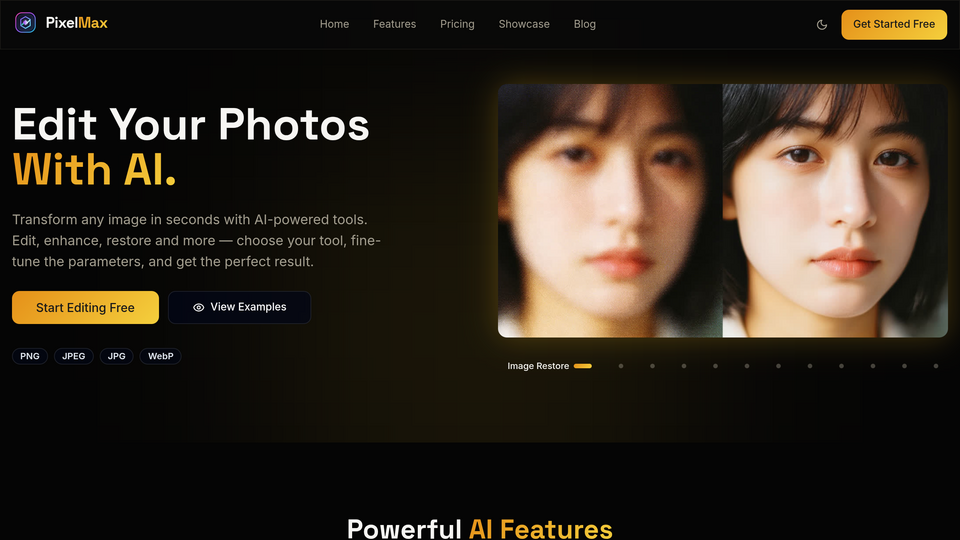
[PixMax](https://pixelmax.art) your AI Image Editor.
Here is a practical look at what the current product can do.
## Portrait and subject-focused tools
These tools focus on improving portraits or building person-and-product compositions:
- Portrait Enhance — Improves clarity and detail in portrait photos.
- Product Holding — Combines a person photo and a product image to create in-hand visuals.
## Enhancement and restoration
When the goal is quality improvement rather than scene replacement, these are the tools users usually start with:
- Photo Enhancer & Upscaler — Sharpens and upscales images using preset enhancement scenarios.
- Image Restore — Repairs faded or damaged-looking images in a simple restore flow.
- Relighting — Applies preset lighting moods such as studio, golden hour, or spotlight.
- Colorize — Adds colour to black-and-white or faded photos using preset colour styles.
## Background and canvas workflows
These tools help when you need a cleaner composition or a new setting:
- Remove Background — Outputs a transparent cutout.
- Replace Background — Generates a new background from a text description.
- Outpaint — Expands the canvas and can optionally use prompts to guide the new area.
## Style and look changes
If you want to change the visual treatment of an image, PixelMax currently offers:
- Style Transfer — Applies built-in art and design presets such as impressionist, anime, cyberpunk, or pixel art.
- Photography Effects — Uses preset looks such as film, vintage film, bokeh effect, soft focus, vignette effect, and double exposure.
- Texture Transform — Changes visible surfaces to materials such as marble, leather, wood, metal, or fabric.
- Perspective Change / Reseason — Reworks viewpoint or season with each tool's own controls.
## Creative edits with text or structured inputs
These tools are useful when you want to change the content of the image:
- Advanced Edit — Uses a text instruction and can optionally benefit from masking for more targeted edits.
- Add Object / Object Removal / Replace Object — Adds, removes, or swaps content based on the instruction field available in each tool.
- Rewrite Text — Replaces visible text in an image.
- Sketch to Image — Turns a sketch or line drawing into a rendered image.
Related tools





Submit your Tool
Publish your website on Twelve.Tools and get a DR 83 dofollow backlink to boost your SEO
Submit Now